
Pmitz / Product guide
Plans and limits in your product
A plan determines which existing features a customer can use. A limit determines how much they can use, over what period, and in which customer, user, subscription, or group context.
What Pmitz applies
Pmitz brings together three decisions in the path of an application action:
- Is the feature included in the configured plan?
- Does the requested amount fit the applicable limit?
- What usage has the application reported for this context and period?
You define the products, features, plans, and limits. Your application supplies consistent customer context, performs the feature, and explicitly reports its successful use.
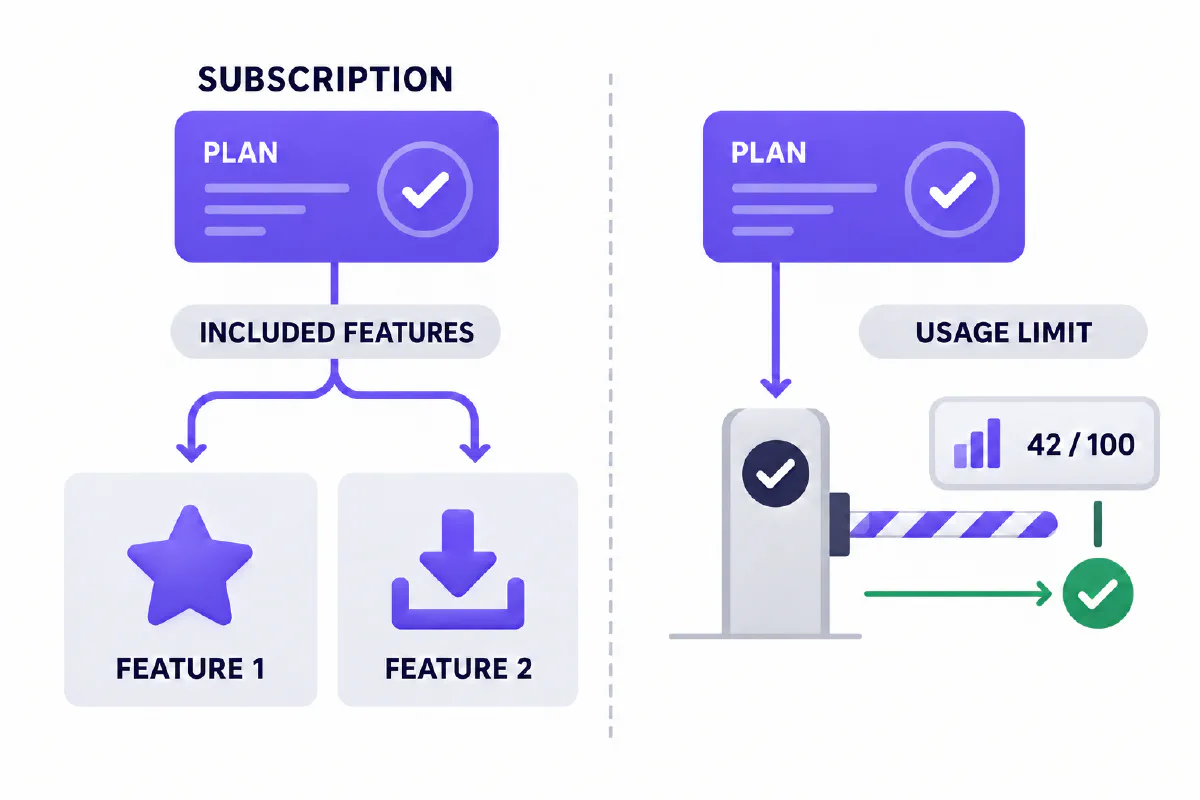
A music-service example
The example is an imaginary music application. It illustrates Pmitz’s rules; it is not a Pmitz music product or a customer case study.
| Original plan | Existing features | Monthly downloads |
|---|---|---|
| Free | Music with ads, one listener | 10 |
| Premium | Ad-free music, family sharing | 100 shared by the family |
With 70 downloads already reported under Premium, 30 remain under the original 100-download limit.
Plan changes
Suppose the music company makes two changes:
- Feature change: Free gains the already implemented family-sharing feature. Its own monthly download limit stays at 10.
- Limit change: Premium keeps family sharing and increases its monthly download allowance from 100 to 200.
Pmitz can apply changed plan membership and applicable limits through the feature checks your team has integrated. Your team still needs to make the changed configuration available. The music feature itself is not created or rewritten by Pmitz.
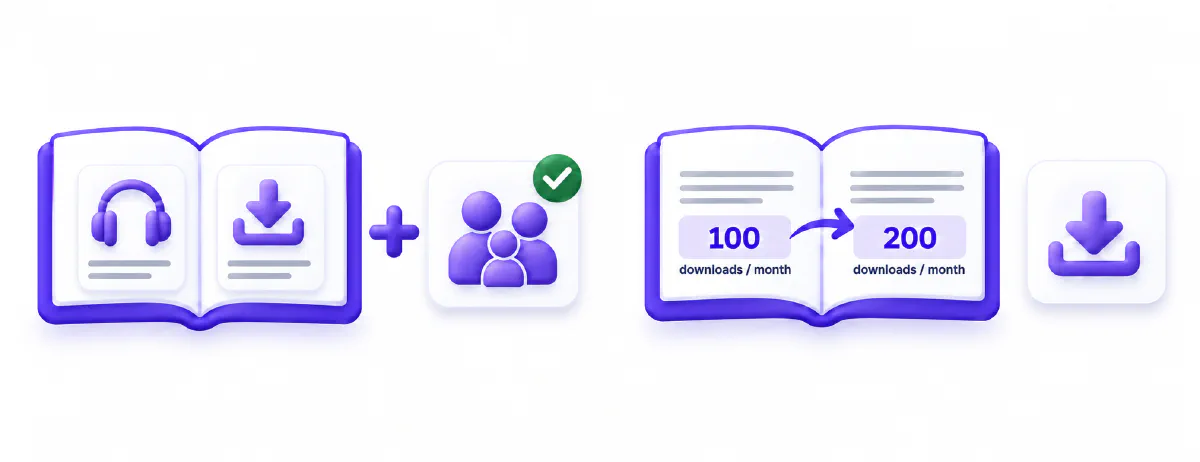
A repeated old check can still stop someone at 100 even after your offer promises 200. Using shared definitions and reusable checks addresses that integration problem; it does not automatically replace old application code or guarantee instantaneous propagation.
Check, use, record
After the Premium limit changes to 200, the same family still has 70 downloads used:
| Step | Responsible system | What happens |
|---|---|---|
| Check | Pmitz | Downloads are included. One more download fits, with 130 remaining. |
| Use | Your application | Performs one download successfully. |
| Record | Pmitz, explicitly called by your application | Updates the period total to 71 used and 129 remaining. |
The next decision uses the updated recorded total. Pmitz does not independently observe a download or discover that an application action succeeded.
Explore the interactive example or start the developer guide .
Customer-specific terms
The same Premium feature may have a standard limit of 200 downloads, while one customer has an agreed allowance of 500.
| Customer context | Used | Applicable limit | Another download |
|---|---|---|---|
| Standard Premium | 200 | 200 | Declined |
| Agreed customer exception | 200 | 500 | Permitted |
Pmitz supports user-specific limit overrides and user, subscription, or directory-group contexts. Your integration supplies the relevant context and configured rule. These exceptions are useful packaging tools; they are not exclusive to Pmitz.
Monthly totals and occupied slots
A monthly quota and a capacity limit count different things.
Monthly downloads
A new calendar window has a separate total. Earlier records can remain while retained.
Saved playlists
Illustrative occupied slots. Creation uses a slot; a reported deletion frees one.
For monthly downloads, a calendar-month limit selects the current period. Last month’s seven downloads do not consume this month’s ten-download allowance. The first report in the new window creates or updates that period’s total. A missing current-period record is treated as zero usage by the default strategy.
For saved playlists, a count limit can describe ten occupied slots. The application reports successful creation to add one, and successful deletion to reduce one. Deleting a playlist can free a slot; deleting a downloaded song does not, by itself, reverse a monthly download.
Usage records are totals, not an activity journal
The supplied recording strategy updates a relevant total instead of creating an immutable event for each song. Records describe the limit, time window, units, expiration, and relevant product/feature/context metadata. They do not contain song names, event identifiers, historical plan snapshots, or saved reasons for past decisions.
Earlier period totals can remain in storage. Repository date criteria can retrieve retained records, while the normal usage API exposes current status and remaining units. A historical report or individual-event audit needs application evidence or an implemented extension.
The default strategy sets a timed record’s expiration to the period end plus three months; unwindowed counts have no expiration. Cleanup is an explicit repository operation. Actual retention depends on storage, strategy, and the cleanup policy; this is not a permanent-history or fixed SaaS-retention promise.
Responsibilities
| Responsibility | Who owns it |
|---|---|
| Choose commercial plans and prices | Your company |
| Establish identity and general role permissions | Your identity and authorization systems |
| Supply subscription status and customer context | Your integration and relevant subscription or billing system |
| Check configured plan membership | Pmitz |
| Resolve and check applicable limits | Pmitz |
| Perform or decline the actual feature | Your application |
| Report successful use or an applicable reduction | Your application calls Pmitz |
| Update the reported usage total | Pmitz |
| Payments, invoices, and taxes | Your billing system |
| Network and infrastructure protection | Your infrastructure and gateway systems |
Supported contexts do not, on their own, establish combined hierarchical enforcement. Configurable rules do not imply a shipped nontechnical editor, an analytics dashboard, or ready-made billing connectors.
Evaluate the complete flow
Before agreeing production commitments, test the situations that matter to your integration:
- Two requests arrive with one unit remaining.
- A business action fails, is cancelled, or is retried.
- A usage report is duplicated, or recording fails after business execution.
- Several application instances share usage state.
- Calendar periods change across time zones.
- A plan changes while requests are in flight.
- Pmitz or its database becomes unavailable.
The repository’s implementation and database tests support evaluating the product. They do not establish an atomic transaction spanning your business operation and usage reporting, automatic rollback of application activity, or production service levels.
Next steps
Integrate one feature , compare operating options , or read the complete product deck .